How It Works

Generate a complete Etsy listing in 2 minutes — in 7 languages.

Before You Start

You've already downloaded the index.html file, opened it in your browser, entered your license key, and the tool is unlocked. No installs, no accounts, no internet connection required after that.

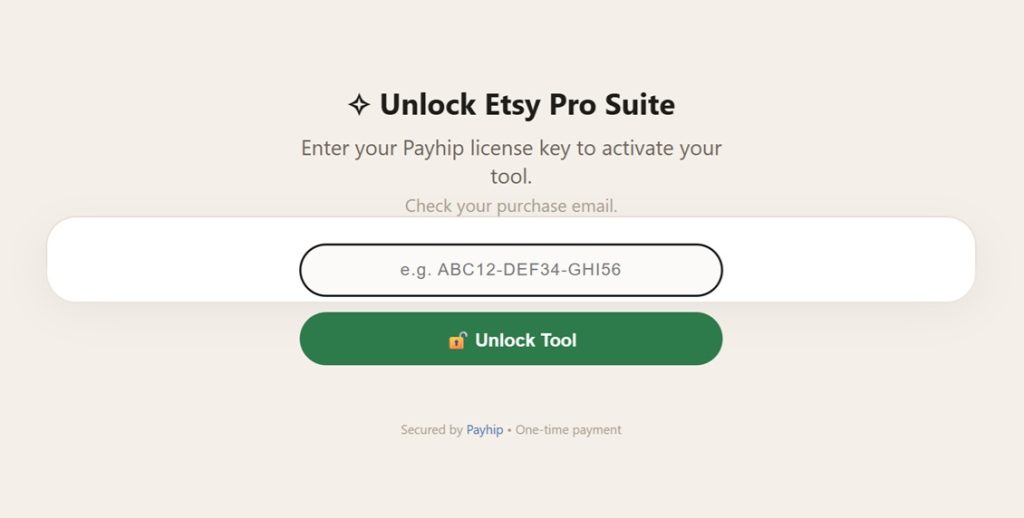
Unlock screen — one-time license key

9 Steps, Start to Finish

Each step builds on the last — fill in real details and the tool does the heavy lifting.

1

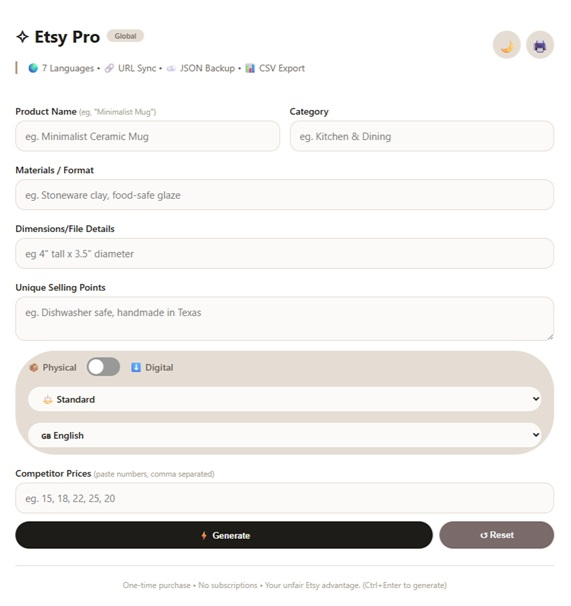
Enter Your Product Details

Fill in the form with your product information:
Product Name – e.g. "Handmade Ceramic Mug"
Category – e.g. "Kitchen & Dining"
Materials / Format – e.g. "Stoneware clay, food-safe glaze"
Dimensions / File Details – e.g. 

4" tall x 3.5" diameter

Unique Selling Points – e.g. "Dishwasher safe, handmade in Texas"
2

Toggle Physical or Digital

If you sell a digital download (printable, SVG, PNG, PDF), toggle the switch to Digital. For physical products, leave it on Physical.

💡

The tool automatically adjusts keywords for digital products — think "instant download," "commercial use," "printable."
3

Choose Your Language

Select one of 7 languages from the dropdown: 🇬🇧 English, 🇪🇸 Spanish, 🇫🇷 French, 🇩🇪 German, 🇵🇹 Portuguese, 🇨🇳 Chinese, 🇯🇵 Japanese.

Your entire prompt — including all instructions — will be generated in your chosen language.
4

Enter Competitor Prices

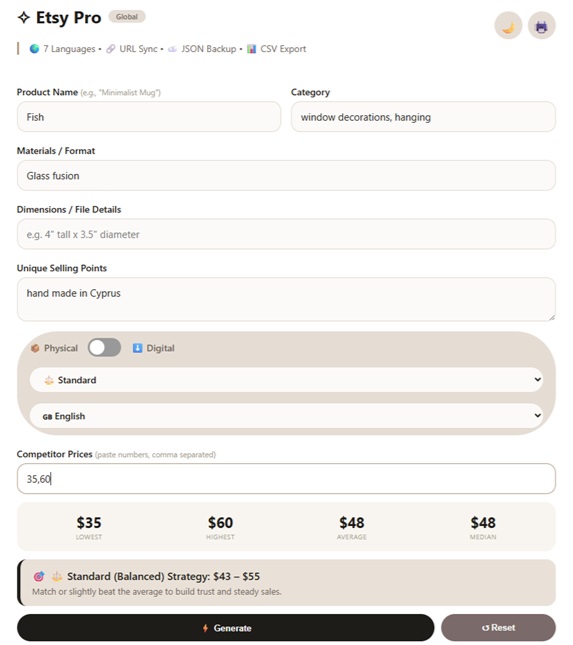
Paste 5 competitor prices (separated by commas) into the field.
Example: 15, 18, 22, 25, 20
The tool instantly calculates:

Lowest price

Highest price

Average price

Median price
5

Choose Your Pricing Strategy

Select your preferred Tier from the dropdown:
🚀 Budget (Volume) – price 10–25% below average
(best for new sellers)
⚖️ Standard (Balanced) – price 5–10% above average
(steady profit)
👑 Premium (High Margin) – price 25–65% above average
(luxury/exclusivity)
The prompt changes based on your choice – telling ChatGPT to emphasize "Best Value", "Quality Craftsmanship", or "Heirloom Luxury".
6

Generate Your Master Prompt

Click the ⚡ Generate button.
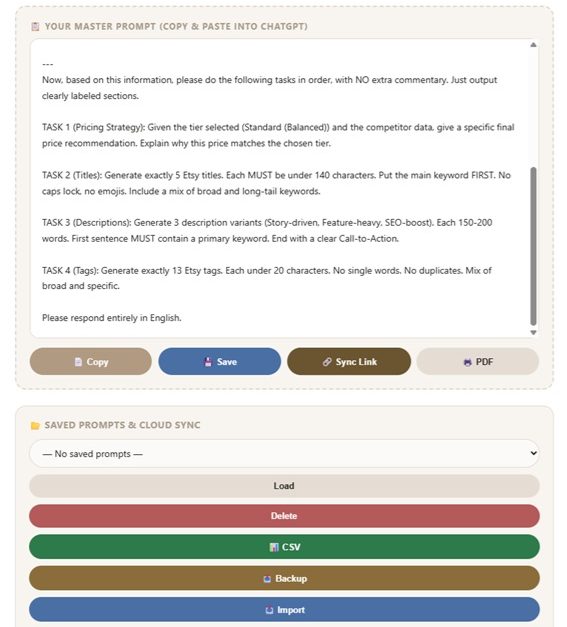
In 2 seconds, the tool produces a complete Master Prompt containing:

5 SEO-optimized titles – all under 140 characters, keyword-first

3 description variants – Story, Feature, and SEO-Boost

13 Etsy tags – no single words, no duplicates

Price recommendation – based on your selected tier and competitor data

⏱️ All of this in 2 seconds – from start to finish.
7

Copy the Prompt

Click the 📄 Copy button. The entire Master Prompt is now copied to your clipboard — ready to paste.

9

Copy the AI Output

Once ChatGPT responds, copy the generated content. Paste it directly into your Etsy listing form. That's it — your complete listing is ready in under 2 minutes.


🎯
Pro Tip: Keyboard Shortcut
Press Ctrl + Enter (Windows) or Cmd + Enter (Mac) to generate a prompt instantly — without clicking the button.

1

Enter Your Product Details

Fill in the form with your product information:
Product Name – e.g. "Handmade Ceramic Mug"
Category – e.g. "Kitchen & Dining"
Materials / Format – e.g. "Stoneware clay, food-safe glaze"
Dimensions / File Details – e.g. 

4" tall x 3.5" diameter

Unique Selling Points – e.g. "Dishwasher safe, handmade in Texas"
2

Toggle Physical or Digital

If you sell a digital download (printable, SVG, PNG, PDF), toggle the switch to Digital. For physical products, leave it on Physical.

💡

The tool automatically adjusts keywords for digital products — think "instant download," "commercial use," "printable."
3

Choose Your Language

Select one of 7 languages from the dropdown: 🇬🇧 English, 🇪🇸 Spanish, 🇫🇷 French, 🇩🇪 German, 🇵🇹 Portuguese, 🇨🇳 Chinese, 🇯🇵 Japanese.

Your entire prompt — including all instructions — will be generated in your chosen language.

4

Enter Competitor Prices

Paste 5 competitor prices (separated by commas) into the field.
Example: 15, 18, 22, 25, 20
The tool instantly calculates:

Lowest price

Highest price

Average price

Median price
5

Choose Your Pricing Strategy

Select your preferred Tier from the dropdown:
🚀 Budget (Volume) – price 10–25% below average
(best for new sellers)
⚖️ Standard (Balanced) – price 5–10% above average
(steady profit)
👑 Premium (High Margin) – price 25–65% above average
(luxury/exclusivity)
The prompt changes based on your choice – telling ChatGPT to emphasize "Best Value", "Quality Craftsmanship", or "Heirloom Luxury".
6

Generate Your Master Prompt

Click the ⚡ Generate button.
In 2 seconds, the tool produces a complete Master Prompt containing:

5 SEO-optimized titles – all under 140 characters, keyword-first

3 description variants – Story, Feature, and SEO-Boost

13 Etsy tags – no single words, no duplicates

Price recommendation – based on your selected tier and competitor data

⏱️ All of this in 2 seconds – from start to finish.
7

Copy the Prompt

Click the 📄 Copy button. The entire Master Prompt is now copied to your clipboard — ready to paste.

9

Copy the AI Output

Once ChatGPT responds, copy the generated content. Paste it directly into your Etsy listing form. That's it — your complete listing is ready in under 2 minutes.


🎯
Pro Tip: Keyboard Shortcut
Press Ctrl + Enter (Windows) or Cmd + Enter (Mac) to generate a prompt instantly — without clicking the button.

Quick Summary Cheat Sheet

Product Details

STEP 01

Fill name, category, materials, dimensions, USPs.

Physical / Digital

STEP 02

Toggle to adjust keywords automatically.

Language

STEP 03

Pick 1 of 7 — whole prompt switches.

Competitor Prices

STEP 04

Paste 5 prices, get instant stats.

Pricing Tier

STEP 05

Budget, Standard, or Premium strategy.

Generate

STEP 06

One click — full prompt in 2 seconds.

Copy

STEP 07

Prompt is on your clipboard instantly.

Paste into ChatGPT

STEP 08

Free tier works — press Enter.

Paste into Etsy

STEP 09

Copy AI output straight into your listing.

Crucial Optimization Guide

Stop ChatGPT failures before they happen.

To prevent ChatGPT from failing to generate your SEO content, you must populate all data fields. The tool functions this way intentionally — to supply the AI with total context.

Field-by-field example

Field

Example
Product NameMinimalist Ceramic Mug
CategoryKitchen & Dining
MaterialsStoneware clay, food-safe glaze
Dimensions4″ tall × 3.5″ diameter, holds 12oz
Selling PointsDishwasher safe, handmade in Texas, one-of-a-kind glaze pattern
Competitor Prices15, 18, 22, 25, 20
TierStandard (Balanced)
I am selling a product on Etsy called “Minimalist Ceramic Mug”.

Category: Kitchen & Dining
Materials/Format: Stoneware clay, food-safe glaze
Dimensions/File Details: 4″ tall x 3.5″ diameter, holds 12oz
Unique Selling Points: Dishwasher safe, handmade in Texas, one-of-a-kind glaze pattern
Type: Physical product
Pricing Tier: Standard (Balanced)
Competitor Prices: $15, $18, $22, $25, $20 (Lowest: $15, Highest: $25, Average: $20, Median: $20)


Now, based on this information, please do the following tasks in order, with NO extra commentary. Just output clearly labeled sections.

TASK 1 (Pricing Strategy): Given the tier selected (Standard (Balanced)) and the competitor data, give a specific final price recommendation. Explain why this price matches the chosen tier.

TASK 2 (Titles): Generate exactly 5 Etsy titles. Each MUST be under 140 characters. Put the main keyword FIRST. No caps lock, no emojis. Include a mix of broad and long-tail keywords.

TASK 3 (Descriptions): Generate 3 description variants (Story-driven, Feature-heavy, SEO-boost). Each 150-200 words. First sentence MUST contain a primary keyword. End with a clear Call-to-Action.

TASK 4 (Tags): Generate exactly 13 Etsy tags. Each under 20 characters. No single words. No duplicates. Mix of broad and specific.

Please respond entirely in English.


IssueCauseSolution
Vague or generic-sounding outputOne or more fields left blank or too shortFill every field with specific, real details before generating
Titles get cut off on EtsyManually edited title past Etsy’s limitUse the generated titles as-is — they’re already capped under 140 characters
Tags feel repetitiveManually added tags overlapping the generated setStick to the 13 generated tags; they’re already deduplicated
Price recommendation feels offCompetitor prices weren’t representative, or had outliersPaste 5 current, real competitor prices for an accurate range
Output isn’t in the language you pickedRe-used an older saved prompt from before switching languagesRe-generate after changing the language dropdown
IssueCauseSolution
Vague or generic-sounding outputOne or more fields left blank or too shortFill every field with specific, real details before generating
Titles get cut off on EtsyManually edited title past Etsy’s limitUse the generated titles as-is — they’re already capped under 140 characters
Tags feel repetitiveManually added tags overlapping the generated setStick to the 13 generated tags; they’re already deduplicated
Price recommendation feels offCompetitor prices weren’t representative, or had outliersPaste 5 current, real competitor prices for an accurate range
Output isn’t in the language you pickedRe-used an older saved prompt from before switching languagesRe-generate after changing the language dropdown

01 Product Name describes the real item, not a placeholder
03 Materials/Format lists real materials or file types
05 Unique Selling Points are claims you can back up
07 All 5 competitor prices are current, real listings
09 Generated tags don’t duplicate words already in the title

02 Category matches one your shop already uses
04 Dimensions/File Details are accurate and unit-correct
06 Physical/Digital toggle matches the actual listing type
08 Pricing tier matches your business stage and goals
10 Final copy proofread for your brand voice before pasting

The tool is designed to work best with 5 competitor prices because that gives a more reliable statistical picture (Min, Max, Average, Median). However, you can still use the tool with 2 prices – here’s how.

Option 1: Use the Tool Anyway (Recommended)

You can enter just 2 prices. The tool will still calculate:

StatisticWith 2 PricesReliability
Min✅ YesAccurate
Max✅ YesAccurate
Average✅ YesSomewhat accurate
Median✅ YesSame as average with 2 numbers
Tier Pricing⚠️ LimitedLess reliable

What to do: Enter the 2 prices. The tool will generate the output, but the pricing recommendation will be less precise. You can use it as a starting point and adjust manually.

Option 2: Add Estimated Prices

If you only have 2 real competitor prices, add 3 estimated prices based on your market knowledge.

ExamplePrice
Real Competitor 1$18
Real Competitor 2$22
Estimated Lower$16
Estimated Mid$20
Estimated Higher$24
Total:5 prices → the tool works perfectly.

Option 3: Use Average/Median Logic Manually

If you prefer not to estimate, you can use the 2 prices and apply simple logic:

ScenarioSuggestion
Two prices are close (e.g., $20 and $22)Your price can be $21 (mid-point) or $23 (premium)
Two prices are far apart (e.g., $15 and $30)The average is $22.50 – price around $22–$25
One is high, one is lowConsider if you want to compete on value (lower) or quality (higher)

Option 4: Quick Research to Find 3 More Prices

If you have 2 prices, it’s usually easy to find 3 more by:

  • Searching Etsy for the same product category
  • Looking at “Similar Items” on competitor listings
  • Checking past sales if you have purchase history

This takes about 2–3 minutes and gives you a complete 5-price data set.

🎯 My Recommendation

ScenarioWhat to Do
You have 2 pricesUse the tool with 2 prices, but treat the pricing recommendation as a rough guide.
You can estimate 3 moreAdd estimates – the tool works perfectly.
You’re unsureUse the Average + 10% rule: if the 2 prices average $20, price at $22.

📝 Summary

Number of PricesWhat the Tool DoesWhat You Should Do
5 pricesFull statistical analysis – Min, Max, Average, Median, Tier recommendationBest – use the output directly
2–4 pricesLimited statistical analysis – some features workGood – use the output as a guide and adjust manually
1 priceCannot calculate Min/Max/Average – tool will prompt youNot recommended – add at least 2 more prices

Ready When You Are

Stop wasting 45 minutes per listing.

Get ranking-ready in 2 minutes — write once, generate in 7 languages, ship faster.